How this blog is built: Astro, Cloudflare Pages, and a custom domain
· 13 min readTable of contents
Every blog is a set of decisions about where the work happens. A traditional CMS like WordPress does the work at request time: a reader asks for a page, a server runs code, queries a database, assembles HTML, and sends it back. That model is flexible, and it is also a standing commitment — a process to keep alive, a database to back up, a surface to patch.
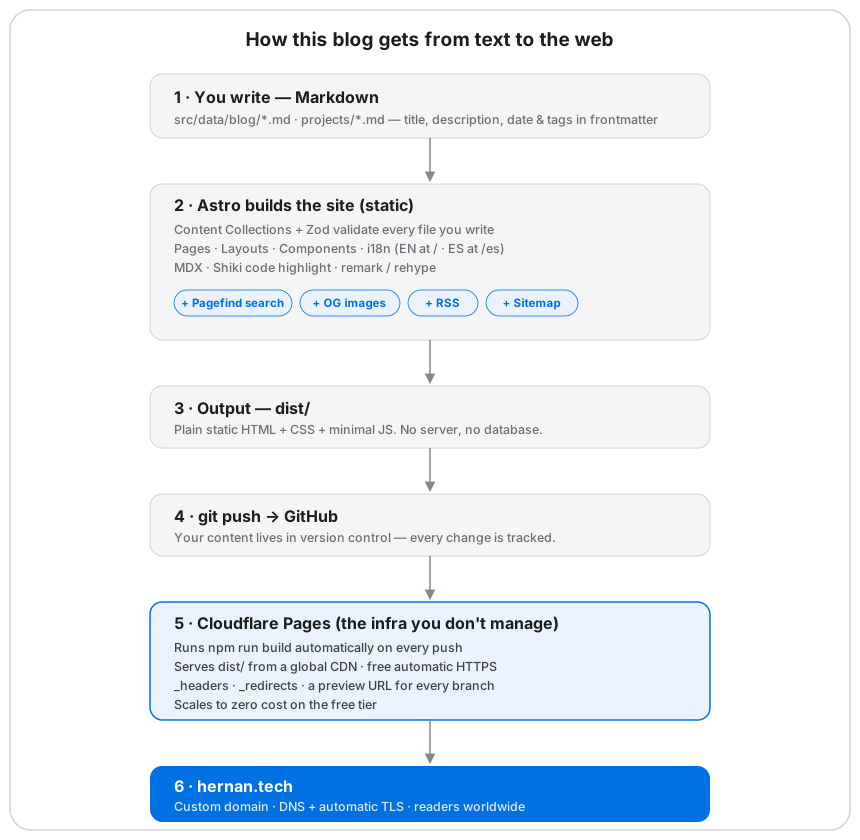
This site makes the opposite choice. All the work happens once, ahead of time, on my machine and on a build server. What reaches the reader is the finished result: plain HTML, CSS, and under 2 KB of JavaScript per page, served as files from a CDN. There is no server to run, no database to maintain, and nothing executing at request time. This article is a walk through that pipeline, layer by layer, with the real numbers from this site’s own build.
Two tools carry most of the architecture, so it is worth naming them up front. Astro is a static site generator: it takes content and templates and renders finished HTML at build time, and it ships no client-side JavaScript unless a component explicitly asks for it. Cloudflare Pages is the host: it builds the project directly from a Git repository and serves the output from its global edge network. Between those two sits the content, which lives as Markdown files in the repo rather than rows in a database. The rest is how those pieces connect.
The content layer: files instead of a database
The first decision is where the writing lives. Here, every post is a file, and
the repository is the database. A post is a Markdown document under
src/data/blog, with a block of frontmatter at the top for its metadata: title,
description, publication date, tags. There is no admin panel and no login. To
publish, I add a file and commit it.
The risk of treating files as a database is that nothing enforces their shape. A mistyped date or a forgotten title would normally surface as a broken page in production, discovered by a reader. Astro closes that gap with content collections: a collection declares a schema, and every file is validated against it during the build. The schema here is written with Zod, a TypeScript-first schema library, so the frontmatter is type-checked with the same rigor as the rest of the codebase.
const blog = defineCollection({
  loader: glob({ pattern: "**/*.{md,mdx}", base: "./src/data/blog" }),
  schema: z.object({
    title: z.string(),
    description: z.string(),
    pubDatetime: z.date(),
    tags: z.array(z.string()).default(["others"]),
    draft: z.boolean().default(false),
    translationKey: z.string().optional(),
  }),
});
The effect is that invalid content cannot reach production. If pubDatetime is
not a real date, or title is missing, the build fails on my machine, long
before anything ships. The error moves from the reader’s screen to my terminal,
which is exactly where I want it.
One field in that schema does more than validate. translationKey is the join
key for internationalization: two posts that share a key are understood to be the
same article in different languages. This site is bilingual, with English served
from the root and Spanish from /es. The language switcher resolves a post’s
counterpart through that key, and when a post has no translation, the switcher
renders as disabled rather than linking to a page that does not exist. The
relationship between the two language versions is data, not a manual cross-link I
have to remember to update.
The build: Astro and zero JavaScript by default
A static site still needs something to turn content into pages, and that is Astro’s job. The detail that matters most is its execution model. Many frameworks render in the browser, shipping a JavaScript bundle that rebuilds the page on the client after it loads. Astro inverts that: it renders to HTML at build time and sends no client runtime at all unless a specific component opts into hydration — Astro calls these interactive components “islands.”
This site uses no islands. The only JavaScript that reaches the reader is a small prefetch helper. That choice is visible in the numbers. Here is the measured transfer size of an article page, gzipped:
| Asset | Gzipped |
|---|---|
| HTML | 6.8 KB |
| CSS | 3.8 KB |
| JS | 1.0 KB |
| Total | 11.6 KB |
For context, the median page tracked by the HTTP Archive is over 2 MB. This page is roughly 170 times smaller, and most of that difference is JavaScript that never gets sent.
Working at build time also changes what “features” cost. On a dynamic platform, search, social images, and feeds are usually plugins that run at request time or services you wire up and maintain. Here they are build steps that produce static output and then have no runtime cost at all:
- Search is handled by Pagefind, which builds a
static index during the build and runs the query in the browser against that
index. The index is the one genuinely heavy asset in the project, so it is
loaded only on
/searchand never on an article page. - Social preview images — the cards that appear when a link is shared — are
generated one per post by
astro-og-canvas, rendered from fonts bundled in the repo so the build needs no network and produces the same output every time. - The RSS feed and sitemap are regenerated on every build, one per locale,
with the
/og/image routes excluded from the sitemap. - Syntax highlighting is done by Shiki at build time, emitting two themes
(
github-lightandgithub-dark) that are swapped with CSS variables. No highlighter runs in the browser.
The common thread is that each of these runs once, when the site is built, and leaves behind nothing but files.
Output and deploy: from a folder to the edge
When the build finishes, astro build has written the entire site into a folder
named dist/ — every page, feed, and image, ready to serve. On this site, a
clean build on Node 24 produces:
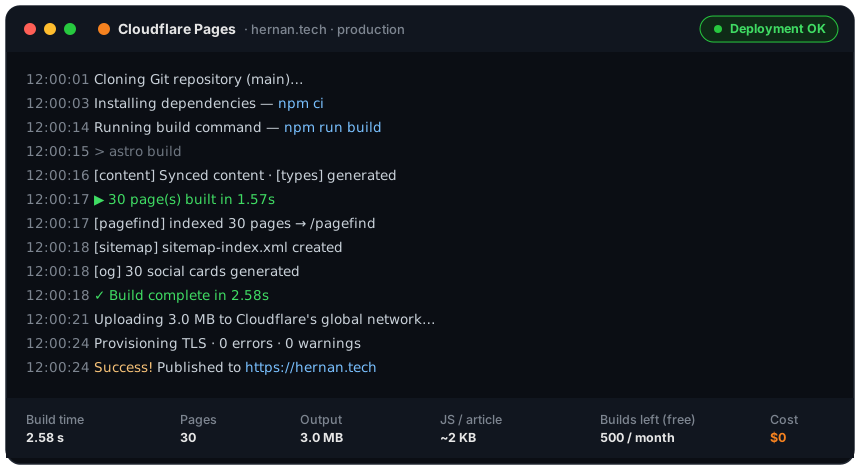
- 2.58 seconds total. Astro reports the 30 pages themselves in 1.57 s; the rest is content sync, Pagefind indexing, and OG image generation.
- 30 pages, covering both languages, every tag page, the archive, the RSS feed, and the sitemap.
- 3.0 MB of total output for the whole site.
Getting that folder onto the internet is where Cloudflare Pages comes in, and the
model is Git-driven rather than manual. I do not build locally and upload.
Instead, I push to GitHub; Cloudflare detects the push, runs npm run build on
its own runners, and distributes the resulting dist/ across its edge network so
that a reader is served from a location near them. The deploy log for this site
looks like this:
Because the deploy is tied to the repository, a few things come for free that would otherwise be setup and upkeep:
- TLS is provisioned and renewed by Cloudflare. The certificate is not something I manage.
- Preview deploys give every branch its own isolated URL, so a change can be reviewed live before it touches the production domain.
- Edge configuration lives in the repo. Two files,
_headersand_redirects, set security headers and route legacy URLs, and they are versioned alongside the code like everything else.
DNS: pointing the domain at Pages
With the site deploying, the last connection is the domain. Mapping both the apex
(hernan.tech) and www to Pages comes down to two records:
Type    Name            Value
CNAME   hernan.tech     <project>.pages.dev
CNAME   www             <project>.pages.dev
There is a subtlety hiding in the first line. A CNAME at the apex of a domain is
invalid under RFC 1034, because the apex already carries other records (such as
SOA and NS) and a CNAME is not allowed to coexist with them. Cloudflare works
around this with CNAME flattening: it accepts the CNAME for the apex but
answers queries with the target’s resolved A/AAAA records, so the root behaves
like an A record while you still configure it as a CNAME. On a registrar without
flattening, you would point the apex at Pages’ anycast IP addresses directly
instead.
From the reader’s side none of this is visible. They type the domain, DNS routes them to the nearest copy of the site, and it loads over a connection Cloudflare secured. From my side it was a one-time configuration.
Knowing who’s reading: analytics without tracking
A static site has no server logging requests, so the obvious question is how I see whether anyone reads it. The usual answer — drop in Google Analytics — would undo two of the things this setup is built around: it adds client-side JavaScript and it tracks the reader. Cloudflare offers its own analytics that avoid both.
Cloudflare Web Analytics is free
and privacy-first. It sets no cookies, writes nothing to localStorage, and does
not fingerprint visitors through their IP address or User-Agent, so it needs no
cookie banner. What it reports is the aggregate shape of traffic:
- Page views and visitors, over time.
- Top pages — which posts are actually read.
- Referrers — where the traffic comes from.
- Countries, browsers, operating systems, and device types — broad segments, not individuals.
It also surfaces Core Web Vitals measured from real visits rather than a lab test: Largest Contentful Paint (LCP), Interaction to Next Paint (INP), and Cumulative Layout Shift (CLS) — load speed, responsiveness, and visual stability. For a site that competes on being light, that is the feedback loop that confirms it stays light in the field.
There is one honest tension to name. Those field metrics are collected by a small JavaScript beacon that uses the browser’s Performance API, so turning them on adds a little client-side code to a site that otherwise ships almost none. The alternative costs nothing extra: because every request already passes through Cloudflare’s edge, the dashboard reports traffic server-side with no beacon at all — you trade the Core Web Vitals detail for keeping the page script-free. Either way, the analytics are part of the same free plan, with no third party in the path.
What it costs
With the architecture in place, the cost follows from it. Compute, edge bandwidth, and TLS are all $0 on the free tier, which leaves the domain as the only recurring expense.
| Item | Dynamic blog | This setup |
|---|---|---|
| Hosting / server | $5–20 / mo | $0 |
| Database | bundled or extra | none |
| TLS | $0–50 / yr or manual | $0, auto-renewed |
| CDN / bandwidth | metered or extra | $0, unmetered |
| Domain | $10–20 / yr | $10–20 / yr |
| Yearly total | $70–250+ | $10–20 (domain only) |
The domain is also where the one real pricing trap lives, and it is worth being
precise about. The number that matters is the renewal price, not the first-year
promotion. A .tech domain can be a couple of dollars to register and then
renews at $40–50 a year; a plain .com holds steady at $10–15 a year, renewal
included. Read the renewal row before committing to a name.
The other question that table invites is where the free tier ends, since “free” is doing real work in it. Cloudflare’s published ceilings are 500 builds per month, unmetered bandwidth and requests, 100 custom domains, 20,000 files per deploy, and 25 MiB per file. There are two ways past $0: more than 500 builds in a month moves you to the $20/month Pro plan, and any Pages Functions you add draw from the Workers free tier of 100,000 requests per day before they bill. A static blog reaches neither — 500 builds is sixteen deploys every day, and there are no functions to invoke.
What “static” still includes
It is easy to read “static” as “limited” — a folder of plain pages and little else. The opposite is true here. Because the work happens at build time, the output can be rich without costing anything at runtime. Everything in the list below is part of this site, and all of it ships as static files:
- Type-safe Markdown — frontmatter validated against a Zod schema at build.
- Fast by default — ~12 KB per article, no client framework.
- Accessible — keyboard navigable and screen-reader friendly (VoiceOver).
- Responsive — from phones to desktops.
- SEO-friendly — canonical URLs, metadata, structured data.
- Light and dark mode.
- Static search — full-text via Pagefind, running in the browser.
- Draft posts and pagination.
- Sitemap and RSS feed — regenerated per locale on every build.
- MDX support — components inside Markdown when a post needs them.
- Collapsible table of contents on each post.
- Built on best practices and highly customizable.
- Dynamic OG image generation — one social card rendered per blog post.
- i18n-ready — the English/Spanish split described above.
None of these is a service running somewhere with a bill attached. Each is a build step that produces files, which is the whole point: the feature set of a dynamic site, delivered with the operational profile of a static one.
Where static stops
It would be dishonest to present this as the answer to everything, so it is worth marking the boundary. Static is the right model when the response is the same for every visitor: blogs, documentation, portfolios, marketing sites. The moment you need per-request server logic — authenticated sessions, a live comment store, a shopping cart, anything personalized at the time of the request — pure static is no longer enough on its own.
The boundary is not a wall. You can add request-time behavior to a static base with Cloudflare Pages Functions or Workers, handling the dynamic parts at the edge while the rest stays static. But if a product is mostly request-time logic, it should not start from a static-first architecture; the static parts would be the exception rather than the rule. A blog is the opposite case, which is why the fit is so clean here.
The takeaway
What stands out, after building it, is how little of the system asks for ongoing
attention. The recurring cost is a domain, and the recurring task is git push.
Everything between the editor and the edge — validation, rendering, indexing,
image generation, TLS, distribution — happens once at build time and then asks
nothing further of me.
That is the real result of moving the work to build time: not just the small numbers, but where the work ends up. It sits in a place I can see and version and rerun, instead of a process I have to keep alive. What is left to think about is the part that was always the point — the writing.
The architecture diagram is editable — the draw.io source lives alongside this post. Build figures are from a clean local build (Node 24, Astro 6) and vary with content and hardware. Opinions here are my own and do not represent my employer.